
Copy and Paste Fonts
Your text in 27 Unicode styles (bold, script, gothic, bubble, strikethrough…), each with one-click copy.
- Free
- No sign-up
- Runs in your browser
See it in action
Blogiantic
𝐁𝐥𝐨𝐠𝐢𝐚𝐧𝐭𝐢𝐜ℬ𝓁ℴℊ𝒾𝒶𝓃𝓉𝒾𝒸𝔅𝔩𝔬𝔤𝔦𝔞𝔫𝔱𝔦𝔠𝔹𝕝𝕠𝕘𝕚𝕒𝕟𝕥𝕚𝕔Ⓑⓛⓞⓖⓘⓐⓝⓣⓘⓒʙʟᴏɢɪᴀɴᴛɪᴄ
14/500
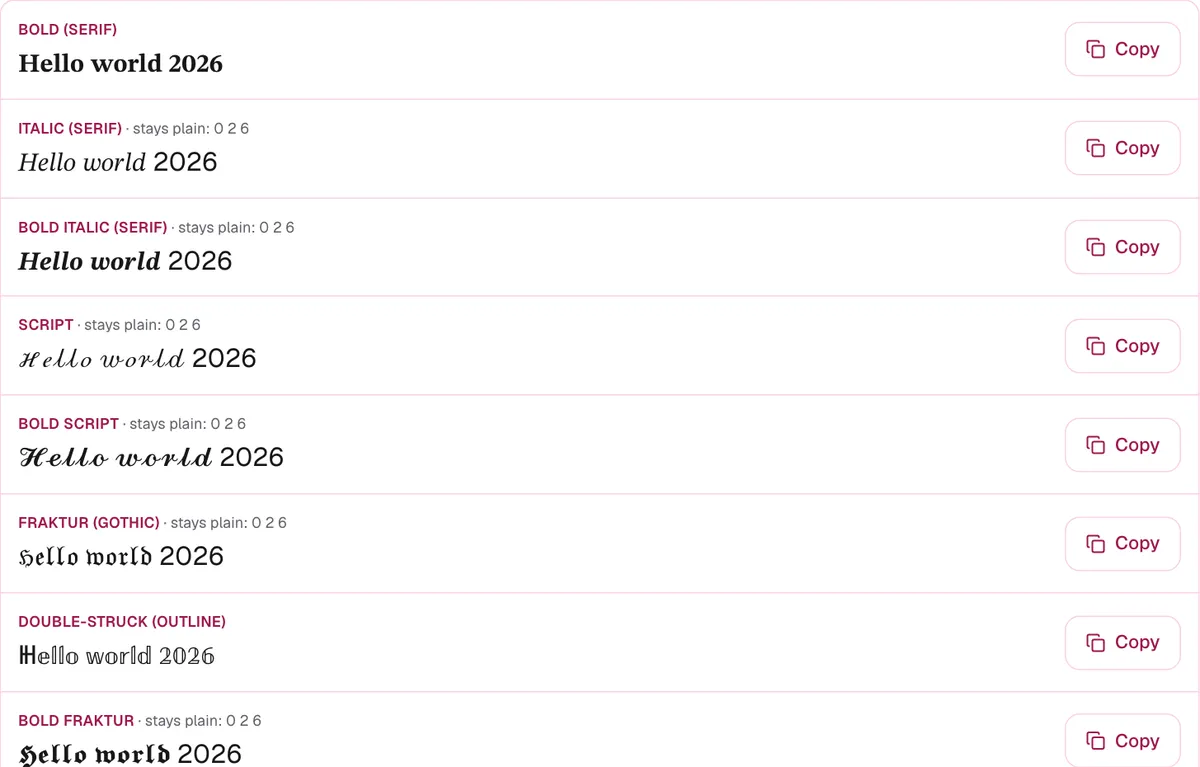
Bold (serif)
𝐘𝐨𝐮𝐫 𝐭𝐞𝐱𝐭 𝐡𝐞𝐫𝐞
Italic (serif)
𝑌𝑜𝑢𝑟 𝑡𝑒𝑥𝑡 ℎ𝑒𝑟𝑒
Bold italic (serif)
𝒀𝒐𝒖𝒓 𝒕𝒆𝒙𝒕 𝒉𝒆𝒓𝒆
Script
𝒴ℴ𝓊𝓇 𝓉ℯ𝓍𝓉 𝒽ℯ𝓇ℯ
Bold script
𝓨𝓸𝓾𝓻 𝓽𝓮𝔁𝓽 𝓱𝓮𝓻𝓮
Fraktur (gothic)
𝔜𝔬𝔲𝔯 𝔱𝔢𝔵𝔱 𝔥𝔢𝔯𝔢
Double-struck (outline)
𝕐𝕠𝕦𝕣 𝕥𝕖𝕩𝕥 𝕙𝕖𝕣𝕖
Bold fraktur
𝖄𝖔𝖚𝖗 𝖙𝖊𝖝𝖙 𝖍𝖊𝖗𝖊
Sans-serif
𝖸𝗈𝗎𝗋 𝗍𝖾𝗑𝗍 𝗁𝖾𝗋𝖾
Sans-serif bold
𝗬𝗼𝘂𝗿 𝘁𝗲𝘅𝘁 𝗵𝗲𝗿𝗲
Sans-serif italic
𝘠𝘰𝘶𝘳 𝘵𝘦𝘹𝘵 𝘩𝘦𝘳𝘦
Sans-serif bold italic
𝙔𝙤𝙪𝙧 𝙩𝙚𝙭𝙩 𝙝𝙚𝙧𝙚
Monospace (typewriter)
𝚈𝚘𝚞𝚛 𝚝𝚎𝚡𝚝 𝚑𝚎𝚛𝚎
Circled
Ⓨⓞⓤⓡ ⓣⓔⓧⓣ ⓗⓔⓡⓔ
Negative circled (capitals)
🅨🅞🅤🅡 🅣🅔🅧🅣 🅗🅔🅡🅔
Squared (capitals)
🅈🄾🅄🅁 🅃🄴🅇🅃 🄷🄴🅁🄴
Negative squared (capitals)
🆈🅾🆄🆁 🆃🅴🆇🆃 🅷🅴🆁🅴
Parenthesized
⒴⒪⒰⒭ ⒯⒠⒳⒯ ⒣⒠⒭⒠
Fullwidth (wide)
Your text here
Small capitals · stays plain: x
ʏᴏᴜʀ ᴛᴇxᴛ ʜᴇʀᴇ
Superscript · stays plain: Y
Yᵒᵘʳ ᵗᵉˣᵗ ʰᵉʳᵉ
Subscript · stays plain: Y
Yₒᵤᵣ ₜₑₓₜ ₕₑᵣₑ
Strikethrough
Y̶o̶u̶r̶ t̶e̶x̶t̶ h̶e̶r̶e̶
Slashed
Y̸o̸u̸r̸ t̸e̸x̸t̸ h̸e̸r̸e̸
Underline
Y̲o̲u̲r̲ t̲e̲x̲t̲ h̲e̲r̲e̲
Double underline
Y̳o̳u̳r̳ t̳e̳x̳t̳ h̳e̳r̳e̳
Overline
Y̅o̅u̅r̅ t̅e̅x̅t̅ h̅e̅r̅e̅
Runs in your browser. Nothing you type is uploaded or stored, and no sign-up is needed.
Updated
See it in action
Blogiantic
𝐁𝐥𝐨𝐠𝐢𝐚𝐧𝐭𝐢𝐜ℬ𝓁ℴℊ𝒾𝒶𝓃𝓉𝒾𝒸𝔅𝔩𝔬𝔤𝔦𝔞𝔫𝔱𝔦𝔠𝔹𝕝𝕠𝕘𝕚𝕒𝕟𝕥𝕚𝕔Ⓑⓛⓞⓖⓘⓐⓝⓣⓘⓒʙʟᴏɢɪᴀɴᴛɪᴄ
Copy and paste fonts are Unicode characters that look like bold, italic, script, gothic and other lettering, so styled text pastes anywhere plain text goes. Type once and this tool shows your text in 27 styles built from the Unicode Character Database 18.0, each with its own Copy button, plus a converter back to plain text. It is free, needs no sign-up and runs in your browser.
How to use it
Type or paste your text into the box. Every style updates as you type, up to 500 characters.
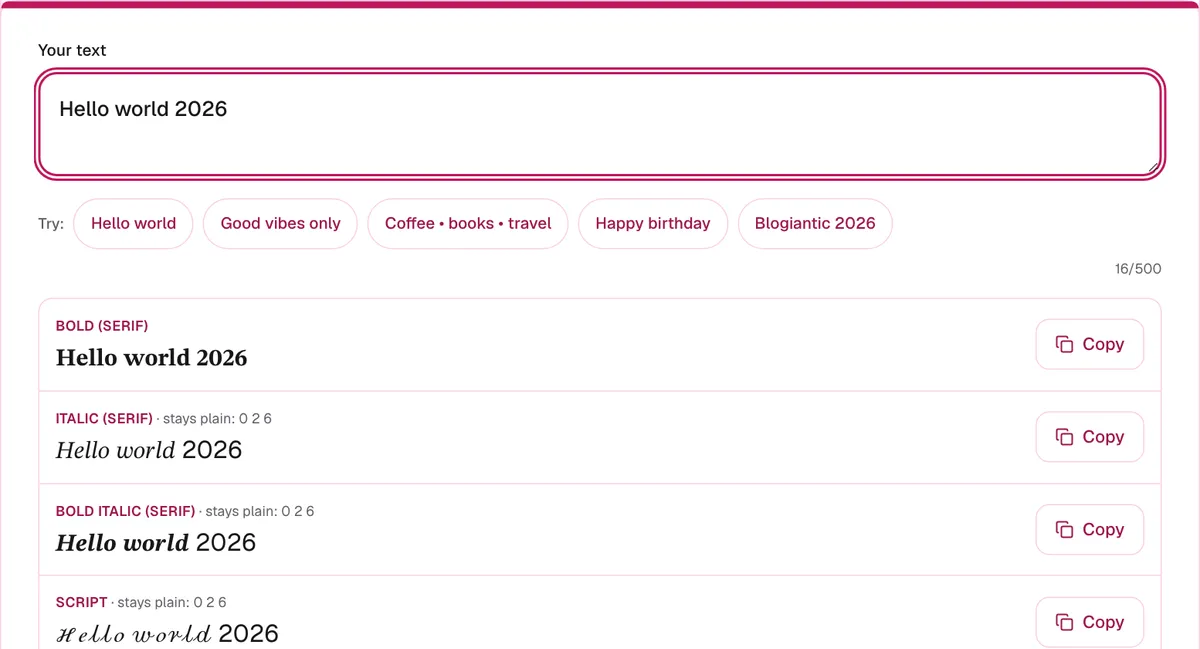
Find the style you want and press its Copy button, then paste it into your bio, caption, message or document. Any letter a style cannot change is listed next to its name.
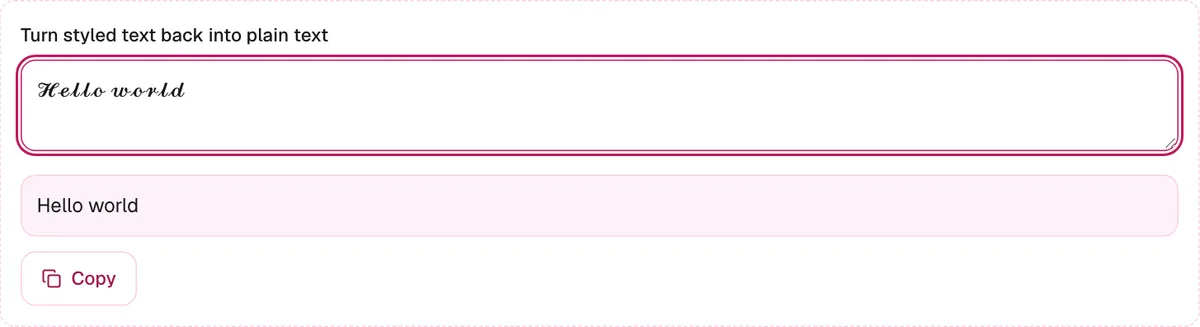
To undo styling, paste styled text into the plain-text box at the bottom and copy the ordinary letters.
Options
- Bold, italic and bold italic
- Serif letters from Unicode's Mathematical Alphanumeric Symbols. Bold also has digits; italic and bold italic leave numbers plain because Unicode has no italic digits.
- Script and bold script
- Cursive capitals and small letters, in a regular and a heavier weight.
- Fraktur and bold fraktur
- Blackletter, the gothic style of old German printing. Bold fraktur is the heavier version.
- Double-struck
- Outlined letters and digits, the style used for number sets such as ℝ and ℕ in mathematics.
- Sans-serif, sans bold, sans italic, sans bold italic
- Clean letters without serifs; sans and sans bold include digits.
- Monospace
- Typewriter letters and digits where every character has the same width.
- Circled and negative circled
- Letters in circles (bubble text). Circled covers letters and digits; negative circled is white-on-black and has capitals only.
- Squared and negative squared
- Letters in boxes, outlined or filled. Unicode encodes these as capitals only, so lowercase input comes out as capitals.
- Parenthesized
- Letters and digits 1 to 9 in brackets. Unicode has no bracketed zero, so 0 stays plain.
- Fullwidth
- Wide letters and digits from East Asian typography, the spaced-out look often called vaporwave text.
- Small capitals
- Capital-shaped letters at lowercase height. Unicode has no small capital X, so X stays plain.
- Superscript and subscript
- Raised or lowered characters. Superscript covers every lowercase letter, all digits and most capitals; subscript covers digits and 20 lowercase letters.
- Strikethrough, slashed, underline, double underline, overline
- A combining mark added after each character, drawing a line through, under or over it. Spaces are left unmarked.
- Back to plain text
- Paste styled text and get ordinary letters back, for search, editing or screen readers.
- Copy and download
- Every style has its own Copy button; Download saves all 27 versions in one .txt file.
They are characters, not fonts
A font changes how the same letters look. These styles work differently: each styled letter is a separate character in the Unicode standard, the same list of characters every modern phone and computer uses. The bold A here is U+1D400 MATHEMATICAL BOLD CAPITAL A, not an ordinary A drawn in bold. Because the styling is in the characters themselves, it survives copy and paste into places that only accept plain text.
This tool looks every character up by its official name in the Unicode Character Database 18.0.0, so no letter is guessed. Where Unicode left a gap in a style because the letter was already encoded elsewhere, such as italic h, script B or fraktur C, the tool uses the character Unicode's own names list points to (ℎ, ℬ, ℭ).
| Style | Unicode block | Letters and digits covered | Sample (A b c 1) |
|---|---|---|---|
| Bold (serif) | Mathematical Alphanumeric Symbols | 62 of 62 | 𝐀𝐛𝐜𝟏 |
| Italic (serif) | Mathematical Alphanumeric Symbols | 52 of 62 | 𝐴𝑏𝑐 |
| Bold italic (serif) | Mathematical Alphanumeric Symbols | 52 of 62 | 𝑨𝒃𝒄 |
| Script | Mathematical Alphanumeric Symbols | 52 of 62 | 𝒜𝒷𝒸 |
| Bold script | Mathematical Alphanumeric Symbols | 52 of 62 | 𝓐𝓫𝓬 |
| Fraktur (gothic) | Mathematical Alphanumeric Symbols | 52 of 62 | 𝔄𝔟𝔠 |
| Double-struck (outline) | Mathematical Alphanumeric Symbols | 62 of 62 | 𝔸𝕓𝕔𝟙 |
| Bold fraktur | Mathematical Alphanumeric Symbols | 52 of 62 | 𝕬𝖇𝖈 |
| Sans-serif | Mathematical Alphanumeric Symbols | 62 of 62 | 𝖠𝖻𝖼𝟣 |
| Sans-serif bold | Mathematical Alphanumeric Symbols | 62 of 62 | 𝗔𝗯𝗰𝟭 |
| Sans-serif italic | Mathematical Alphanumeric Symbols | 52 of 62 | 𝘈𝘣𝘤 |
| Sans-serif bold italic | Mathematical Alphanumeric Symbols | 52 of 62 | 𝘼𝙗𝙘 |
| Monospace (typewriter) | Mathematical Alphanumeric Symbols | 62 of 62 | 𝙰𝚋𝚌𝟷 |
| Circled | Enclosed Alphanumerics | 62 of 62 | Ⓐⓑⓒ① |
| Negative circled (capitals) | Enclosed Alphanumeric Supplement | 52 of 62 | 🅐🅑🅒 |
| Squared (capitals) | Enclosed Alphanumeric Supplement | 52 of 62 | 🄰🄱🄲 |
| Negative squared (capitals) | Enclosed Alphanumeric Supplement | 52 of 62 | 🅰🅱🅲 |
| Parenthesized | Enclosed Alphanumerics | 61 of 62 | ⒜⒝⒞⑴ |
| Fullwidth (wide) | Halfwidth and Fullwidth Forms | 62 of 62 | Abc1 |
| Small capitals | Phonetic letters (several blocks) | 50 of 62 | ᴀʙᴄ |
| Superscript | Modifier letters and superscripts (several blocks) | 59 of 62 | ᴬᵇᶜ¹ |
| Subscript | Subscripts (several blocks) | 30 of 62 | ₁ |
Source: Unicode Character Database 18.0.0 (UnicodeData.txt and NamesList.txt)
Accessibility and search: what to keep plain
Unicode's names list says the Mathematical Alphanumeric Symbols, the source of most of these styles, are meant for mathematical variables where the style carries meaning, and that general text should use ordinary letters with formatting. Because they are different characters from ordinary letters, software that does not fold them back to plain letters can treat 𝐡𝐞𝐥𝐥𝐨 and hello as different words, and screen readers may not read them as words at all.
- Keep your name, keywords, hashtags, links and anything a reader must understand in plain text.
- Use styles for a short decorative word or heading rather than whole sentences.
- If you receive styled text you need to search, edit or read aloud, convert it back with the plain-text box.
Source: Unicode NamesList.txt, Mathematical Alphanumeric Symbols block note
Why some letters stay plain
Unicode encodes only the characters people asked for, so not every style has every letter or digit. The tool never invents a lookalike: a character a style lacks is left as you typed it, and the list shows which ones.
- Italic, bold italic, script, bold script, fraktur, bold fraktur, sans italic and sans bold italic have letters but no digits.
- Negative circled, squared and negative squared exist only as capitals; parenthesized letters exist only in lowercase, with digits 1 to 9.
- Small capitals have no X. Superscript has no capital X, Y or Z.
- Subscript has digits and 20 lowercase letters (a, e, h, i, j, k, l, m, n, o, p, r, s, t, u, v, w, x, y and z), but no b, c, d, f, g or q and no capitals.
Where styled text works
Styled text is ordinary Unicode text, so it can be pasted into social media bios and posts, display names, chat messages, comments, documents and spreadsheets. Whether it shows correctly depends on the fonts on the reader's device: where a device has no drawing for a character, it shows an empty box or a placeholder symbol instead. Before using a style somewhere important, check how it looks on another device.
How the back-to-plain converter works
Each styled character in Unicode is linked to the ordinary letter it is based on (a compatibility decomposition). The converter first uses this tool's own table, then applies Unicode's NFKC normalization for anything else, and finally removes the strikethrough, slash, underline and overline marks. Capitals-only and lowercase-only styles come back in the case Unicode encodes them in.
Questions
Are these real fonts?
No. They are Unicode characters that look like styled letters, which is why they can be pasted into places that do not let you choose a font.
Will the styles show on every phone and computer?
Only where the reader's device has fonts that draw those characters. Where it does not, the reader sees an empty box or placeholder symbol, so check the result on another device before relying on a style.
Can I use them in my social media bio?
You can paste them anywhere plain text is accepted. Keep your name, keywords and hashtags in plain text, because search and screen readers can treat styled characters differently from ordinary letters.
Why didn't some of my letters or numbers change?
Unicode does not encode every letter and digit in every style, for example there are no italic digits and no small capital X. The tool leaves those characters as you typed them and lists them next to the style.
Can I turn styled text back into normal text?
Yes. Paste it into the plain-text box under the styles and copy the result.
Is my text saved or sent anywhere?
No. Every style is produced in your browser and nothing you type is uploaded or stored.
More free tools
- Random Name GeneratorReal first and last names from U.S. Census lists, up to 100 at a time, with letter and length filters.Use it
- Ship Name GeneratorBlends 2 to 5 names into couple or fandom ship names, best-sounding first, with how each was made.Use it
- Calcul âgeIn FrenchExact age calculator in French: years, months and days between a date of birth and any date.Use it